Set your risk rules.Execute futures fromTelegram in seconds.
Place Bybit futures orders from Telegram. Risbot sizes each trade from your stop, includes fees, checks the limits you set and explains a refusal before an order reaches the exchange.
Free plan, no payment. It never asks for withdrawal permission.
How Risbot works
All done in ~3 seconds
- Trading day allowed
- Daily loss limit
- Max risk per trade
- Sized to your stop
- Risk:reward after fees
- and more checks on every trade
- Trading day allowed
- Daily loss limit
- Max risk per trade
- Sized to your stop
- Risk:reward after feesRisk:reward after fees
- and more checks on every trade
$78005.60
Margin Used: $4.97
Risk: $0.46 (1.00% of balance)
Current Position
Avg. Entry: $78149.30
Take Profit: $78892.60
Position Size: 0.002 ($156.30)
Value: $156.30
Initial Margin: $4.97
Maintenance Margin: $0.52
Entry Fee: 0.05500%
Stop Fee: 0.05500%
Risk-Reward Ratio: 2.86
Net Profit (after fees): $1.31
Net Loss (after fees): $0.46
Total Risk: $0.46 (1.00% of balance)Three steps to your first trade.
You can set everything up before you connect a key.
Connect your key


Encrypted in your browser. The form works once, for 15 minutes.
Set your rules
Every setting works before you connect anything.
Send a trade
The bot sizes it, checks it, then places it - or tells you why not.
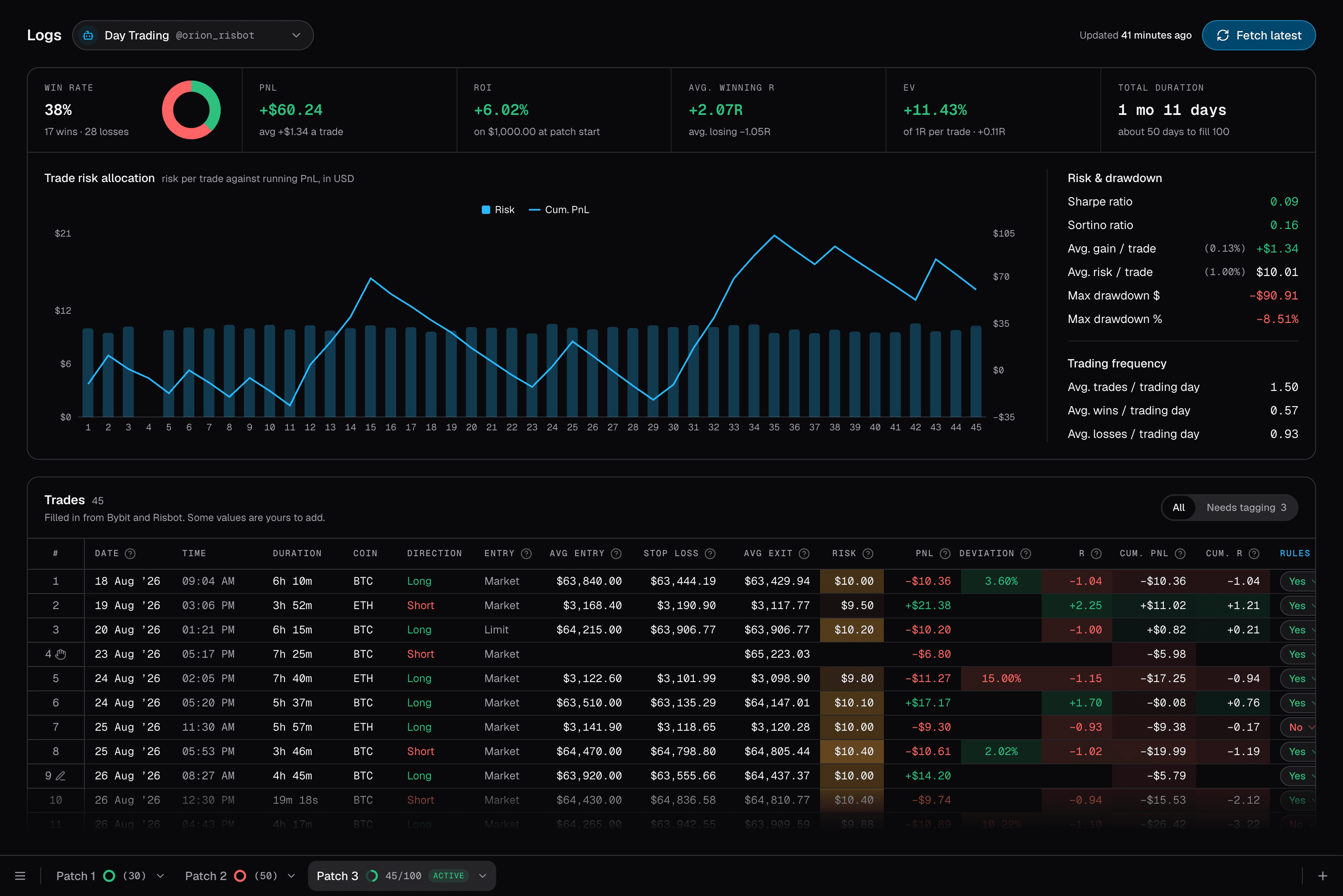
Every trade, logged
Every closed position, pulled in from Bybit, with win rate, R, drawdown and risk per trade calculated by Risbot for you.
Why not just trade on the exchange?
The exchange takes any order. Risbot checks it first.
Speed
Risk, fees and leverage calculated and checked in one go, the same way every time.
No emotion, no hesitation.
Send it from bed — every risk rule is still applied.
Rushing not to miss the entry: wrong size, forgotten fees, a broken risk rule.
Slower, and easier to get wrong.
You have to be at your desk every time an entry appears.
Sizing
You set the stop. It works out the size.
You do the maths yourself.
Leverage
Only what the trade needs. Too much? Refused.
Whatever you left it on last.
Reward vs risk
Under 1:1 after fees? Refused.
Nobody checks.
Daily loss limit
A bad day? New trades stop.
It lets you keep going.
Trading days
Pick your days. Weekends off, if you like.
Every day is a trading day.
Real numbers
Profit and loss shown after fees.
You add up the fees yourself.
Adding to a trade
Respects the trade's max risk allowance.
Each add is a new, separate order.
Take profit
Fixed risk-to-reward, or a price you type.
Hard to set a precise fixed risk-to-reward every time.
Sniper vs Manual Entry
Pick the panel that fits how you trade. The bot sizes the position either way.
Sniper: Made for scalpers
- Always a market order. It fills the moment you tap Send.
- The stop sits just past the lowest wick of your last few closed candles (the highest for a sell). You pick how many.
- No prices to type. Pick a symbol and a side and fire.
- Presets let you switch between setups in one tap.
Manual Entry: Made for day traders
- Limit orders at your exact price, or market orders if you want to enter now.
- You set the stop loss price yourself. The bot sizes the trade around it.
- Preview your PnL, risk:reward after fees and more before you enter.
Whichever you choose, Sniper or Manual Entry, the position is managed the same way.
- Add to your position
- Update your take profit
- Move your stop to breakeven
One account, several bots.
Each bot has its own key and rules. Keys are only added on the website.
Two example bots: Day Trading, armed, and Swing, paused by its owner.

Set rules once.
Applied on every trade.
Seven settings, all changed in the chat.
- Balance alertWe warn you if your balance on the exchange becomes more than you'd like to keep on Bybit.
- Max Risk Per TradeThe most one trade can lose.
- Dollar Risk CapAdding to a trade can't go over its budget.
- Collateral BalanceCounts money you keep off the exchange.
- Buffer PercentKeeps part of your balance free, so a trade never uses all of it.
- Balance RangeWarns if too much or too little is on the exchange.
- Daily Loss LimitStops new trades for the day after a set % of your balance or a set number of losing trades. You set the rules.
- Trading DaysDisable trading on specific days.
You set the stop. The bot sets the size.
Leverage follows from the size, so you can never lose more than your risk per trade.
Short stop = larger position size.
Long stop = smaller position size.
Same risk, whatever the stop distance.
Every trade must pass 6 checks
If one fails, you're told which.
What's in an executed trade notification
One message in the chat, with every number that matters.
- Executed in 3.2 secondsHow long it took to place your trade.
- LeverageWe always keep your liquidation price far away from your stop.
- Your entryOrder type (market or limit), position size and entry price.
- Risk-to-reward ratioCalculated after fees.
- Total riskThe total amount of your balance risked on this trade.
How rejected trades look.
Right in the chat, in plain words.
Protect your money on very bad days.
Set a number of losing trades, or a % of your account. On from the start, at 2 trades or 2%.
- Remaining TradesHow many more losing trades you can take today.
- On holdReserved for an active trade.
- Max Percent LossThe most you allow yourself to lose in a single day.
- UTC OffsetWhen your trading day starts.
When the limit is hit, you choose what happens
Nothing else goes out today.
Shrinks trades to what's left.
Warns you, lets it through.
Why Telegram? Not an app
It's already on your phone.
Already there
Where crypto traders are.
Nothing to install
It's just a chat.
Fast anywhere
Any phone or computer.
Very easy to use
Just tap buttons and commands.
Your results, as charts in the chat.
Drawn by the bot, sent to the same chat.
Your account, trade by trade.
One bar per day, after fees.
Each trade's risk, with your running profit.
Your API key is safe.
Keys are only added on the website, never typed into the chat.
We never hold your money or your password.
No withdrawal permission ever required.
Made on a Bybit sub-account, which can't withdraw.
Locked to our server's IP address.
The connect form works once, for 15 minutes.
Your stop loss and take profit sit on Bybit, not in the bot.
Before you connect a key.
Set your limits now, while you're calm.
Set your rules first. Connect a key when you're ready.